Where Do You Get the Best Images for Your Website and Social Media Posts?
When it comes to making sure your website looks good and your social media looks good, having good photography is one of the most important things that you can have. But where to find these?
I recommend taking your own photos, you know, using your phone if you can, or hiring a photographer to come take photos. That’s always a good thing because photos that are brand new on the web, they’ve never been on there before, always hold the most weight in Google search, and they’re most valuable for your website.
But if you cannot take your own photos or hire a photographer, sometimes you just want some stock.
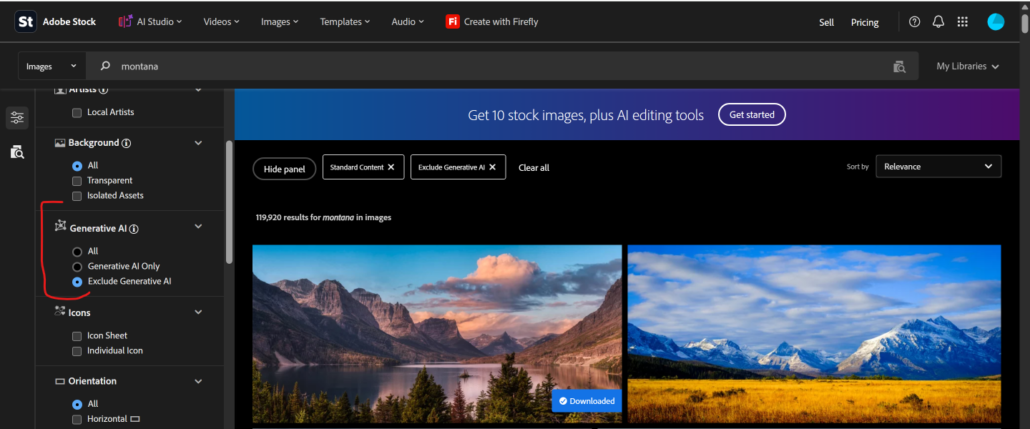
I recommend either going to Adobe Stock and buying them. If you go to Adobe Stock, you can get some very high-quality images. That’s my favorite site to find them, even though it is a little pain with the payment system on there and you have to subscribe to get images.
They’re about $10 per photo if you want to buy them. You just have to buy them in packs of four on subscription, monthly subscription, and you can cancel after you get those four.
But I recommend turning off generative AI on Adobe. On the left-hand side, there’s a filter menu. Open that up and look for AI, and then turn off generative AI and then search for just images because you don’t want to be paying $10 for an image you could just create with ChatGPT.
Next, let’s look at some free images on the web. For free stock images, I like to use Pexels.com. That is my favorite website, but here’s the best way to search Pexels.
Don’t go to the search bar on the website. Go to ChatGPT and open and tell it, explain the project that you have or whatever you need the images for, and tell it to search Pexels.com for the very best images for that specifically.
That will really help because it will give you the top three choices. You can click through and check each one of them out, and if you don’t like those, you can always prompt it to get you more options on photos.
If Pexels has nothing you like, you can tell ChatGPT to search the web for free image sites to find some more or video sites. That always works.
And lastly, I’m going to talk about Creative Commons.
So if you go to images.google.com, you can search for whatever image that you’re looking for and then change, at the top there’s Tools, change that Tools section down to Usage Rights and then from Usage Rights, change it to Creative Commons.
That’s going to filter out just the images that have a Creative Commons license on them, which means that they’re free to use on whatever project you want to use them for.
Now these images have been used by so many other websites that they’re not really that valuable.
One way to make them valuable is to take them into Photoshop and to change the pixel density.
How do we change the pixel density?
We change the saturation by either saturating more or desaturating the image. That will change the pixel density, or brightening or darkening the image.
Any one of those directions, either saturation or darkening, lightening, will change the pixel density and therefore the image is now a brand new image after you save it, and you can then load that up to your website and use it and get the credit for it.
You don’t have to worry about this if you’re just posting social media. This is only for your website for SEO concerns.
If you have more questions about getting the proper photography uploaded into your website or if you’re having challenges finding good photos for your web designer, you can send us a message our contact page and I will be glad to help you out.